|
|
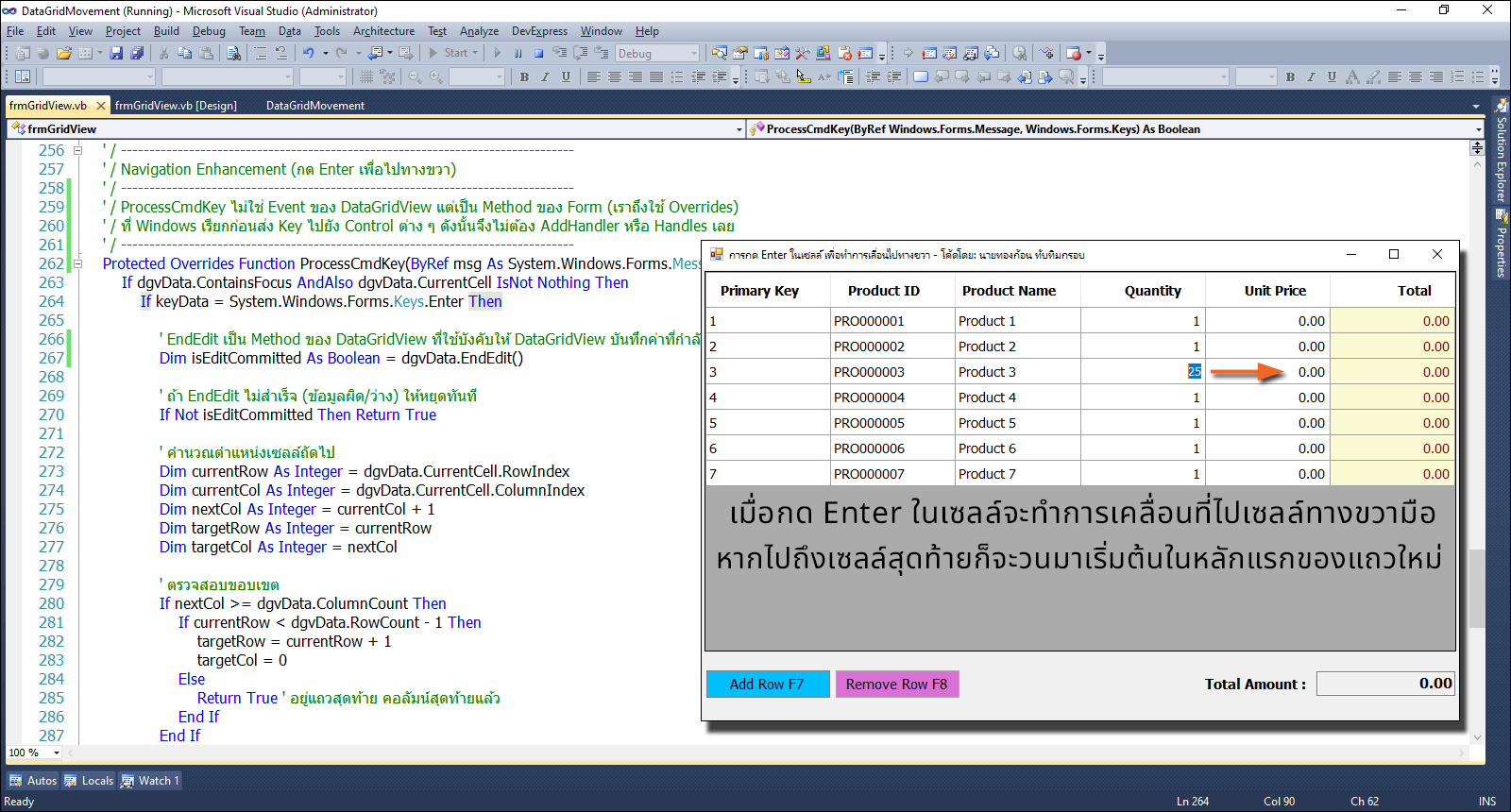
โดยปกติหากเรากด Enter ในเซลล์ของตารางกริด หรือตารางเอ็กเซลล์ ก็จะเกิดการเคลื่อนที่ลงไปในแถวถัดไปเสมอ (ยกเว้นว่ากดลูกศรขวา) แต่ถ้าหากเราอยากให้เลื่อนเซลล์ไปทางขวาล่ะ จะทำอย่างไร??? ... โค้ดชุดนี้จะเป็นการแก้ปัญหาในเรื่องนี้ด้วยการนำ ProcessCmdKey เข้ามาช่วย ...
ProcessCmdKey ไม่ใช่ Event ของ DataGridView แต่เป็น Method ของ Form (เราถึงใช้ Overrides) ที่ Windows เรียกก่อนส่ง Key ไปยัง Control ต่างๆ ดังนั้นจึงไม่ต้อง AddHandler หรือ Handles เลย ...
การทำงานของ ProcessCmdKey
1. ผู้ใช้กด Enter ที่ Cell Quantity (จำนวนสินค้า)
2. Windows ส่ง Message WM_KEYDOWN ไปยัง Form (คล้ายๆกับการเรียกใช้งาน WinAPI32)
3. Form.ProcessCmdKey ถูกเรียก
4. ตรวจสอบว่า dgvData มี Focus และกด Enter
5. เรียก dgvData.EndEdit() - บันทึกข้อมูล
6. คำนวณว่า Cell ถัดไปคือ UnitPrice
7. ใช้ BeginInvoke เพื่อเลื่อนไป UnitPrice
8. Return True (บอกว่าเราจัดการ Enter แล้ว)
9. DataGridView ไม่ได้รับ Event Enter
10. หลังจาก ProcessCmdKey จบ BeginInvoke ทำงาน
11. CurrentCell เปลี่ยนไป UnitPrice
12. BeginEdit(True) - เปิดให้แก้ไขทันที
ความหมายของฟังค์ชั่น ProcessCmdKey ...
- Protected Overrides Function ProcessCmdKey(ByRef msg As System.Windows.Forms.Message, ByVal keyData As System.Windows.Forms.Keys) As Boolean
Function ... As Boolean : ต้องคืนค่า True หรือ False
True = "จัดการคีย์นี้แล้ว ไม่ต้องส่งต่อ ให้ใครอีก"
False = "ไม่ได้จัดการ ส่งต่อไปให้ Control อื่นประมวลผลต่อ"
msg: ข้อความดิบจาก Windows OS (ระดับต่ำมาก ปกติไม่ต้องใช้)
keyData: คีย์ที่กด (เช่น Keys.Enter, Keys.Tab)
มาดูโค้ดฉบับเต็มกันเถอะ ...
- Public Class frmGridView
- ' กำหนดค่าคงที่สำหรับดัชนีคอลัมน์ (ป้องกัน Magic Numbers)
- Private Const colPK As Integer = 0
- Private Const colProductID As Integer = 1
- Private Const colProductName As Integer = 2
- Private Const colQuantity As Integer = 3
- Private Const colPrice As Integer = 4
- Private Const colTotal As Integer = 5
- Public Sub New()
- ' This call is required by the designer.
- InitializeComponent()
- ' Add any initialization after the InitializeComponent() call.
- InitializeGrid()
- End Sub
- Private Sub frmGridView_Load(sender As Object, e As EventArgs) Handles MyBase.Load
- Me.KeyPreview = True
- Me.CenterToScreen()
- txtSumTotal.ReadOnly = True
- txtSumTotal.Text = "0.00"
- End Sub
- Private Sub frmGridView_KeyDown(sender As Object, e As KeyEventArgs) Handles Me.KeyDown
- ' ตรวจสอบว่าโฟกัสไม่ได้อยู่ในโหมดแก้ไขข้อความ เพื่อป้องกันการทำงานซ้อน
- If Not dgvData.IsCurrentCellInEditMode Then
- Select Case e.KeyCode
- Case Keys.F7
- btnAdd.PerformClick()
- Case Keys.F8
- btnRemove.PerformClick()
- End Select
- End If
- End Sub
- ' / --------------------------------------------------------------------------------
- ' / Grid Initialization & Styling
- ' / --------------------------------------------------------------------------------
- Private Sub InitializeGrid()
- With dgvData
- .RowHeadersVisible = False
- .AllowUserToAddRows = False
- .AllowUserToDeleteRows = False
- .AllowUserToResizeRows = False
- .MultiSelect = False
- .ReadOnly = False
- .RowTemplate.Height = 27
- .Font = New Font("Tahoma", 10.0!)
- .DefaultCellStyle.Font = New Font("Tahoma", 10.0!, FontStyle.Regular)
- .RowsDefaultCellStyle.Font = New Font("Tahoma", 10, FontStyle.Regular)
- .AutoSizeColumnsMode = DataGridViewAutoSizeColumnsMode.Fill
- ' ปิดการปรับขนาดโดยผู้ใช้ (ถ้าต้องการให้คงที่)
- .ColumnHeadersHeightSizeMode = DataGridViewColumnHeadersHeightSizeMode.DisableResizing
- ' กำหนดความสูงของ Header
- .ColumnHeadersHeight = 38
- ' จัดรูปแบบ Header
- With .ColumnHeadersDefaultCellStyle
- .BackColor = Color.Navy
- .ForeColor = Color.White
- .Font = New Font("Tahoma", 10.0F, FontStyle.Bold)
- .Alignment = DataGridViewContentAlignment.MiddleCenter
- End With
- End With
- With dgvData
- ' กำหนดโครงสร้างคอลัมน์
- .Columns.Add("PK", "Primary Key")
- .Columns.Add("ProductID", "Product ID")
- .Columns.Add("ProductName", "Product Name")
- .Columns.Add("Quantity", "Quantity")
- .Columns(colQuantity).ValueType = GetType(Decimal) ' ใช้ Decimal เพื่อความแม่นยำของตัวเลข
- .Columns.Add("UnitPrice", "Unit Price")
- .Columns(colPrice).ValueType = GetType(Decimal)
- .Columns(colPrice).DefaultCellStyle.Format = "N2"
- .Columns.Add("Total", "Total")
- .Columns(colTotal).ValueType = GetType(Decimal)
- ' จัดรูปแบบคอลัมน์ Total
- With .Columns(colTotal)
- .ReadOnly = True
- .DefaultCellStyle.BackColor = Color.LightGoldenrodYellow
- .DefaultCellStyle.ForeColor = Color.DarkRed
- .DefaultCellStyle.Font = New Font(dgvData.Font, FontStyle.Bold)
- .DefaultCellStyle.Format = "N2" ' จัดรูปแบบเป็นทศนิยม 2 ตำแหน่งอัตโนมัติ
- End With
- ' จัดชิดขวาสำหรับคอลัมน์ตัวเลข (3, 4, 5)
- For i As Integer = colQuantity To colTotal
- .Columns(i).HeaderCell.Style.Alignment = DataGridViewContentAlignment.MiddleRight
- .Columns(i).DefaultCellStyle.Alignment = DataGridViewContentAlignment.MiddleRight
- Next
- End With
- End Sub
- ' / --------------------------------------------------------------------------------
- ' / Row Management
- ' / --------------------------------------------------------------------------------
- Private Sub btnAddRow_Click(sender As Object, e As EventArgs) Handles btnAdd.Click
- Dim newPK As Integer = 1
- If dgvData.RowCount > 0 Then
- ' ดึงค่า PK จากแถวสุดท้ายแล้วบวกเพิ่ม
- Dim lastPKObj As Object = dgvData.Rows(dgvData.RowCount - 1).Cells(colPK).Value
- If lastPKObj IsNot Nothing AndAlso IsNumeric(lastPKObj) Then newPK = Convert.ToInt32(lastPKObj) + 1
- End If
- ' เพิ่มแถวใหม่
- Dim newRow As String() = {
- newPK.ToString(),
- String.Format("PRO{0:D6}", newPK),
- "Product " & newPK.ToString(),
- "1",
- "0.00",
- "0.00"
- }
- dgvData.Rows.Add(newRow)
- ' ย้ายโฟกัสไปที่ช่อง Quantity ของแถวใหม่ และเริ่มแก้ไขทันที
- Dim lastRowIndex As Integer = dgvData.RowCount - 1
- dgvData.CurrentCell = dgvData.Rows(lastRowIndex).Cells(colQuantity)
- dgvData.BeginEdit(True)
- RecalculateGrandTotal()
- End Sub
- Private Sub btnRemoveRow_Click(sender As Object, e As EventArgs) Handles btnRemove.Click
- If dgvData.CurrentRow IsNot Nothing AndAlso Not dgvData.CurrentRow.IsNewRow Then
- dgvData.Rows.Remove(dgvData.CurrentRow)
- RecalculateGrandTotal()
- End If
- End Sub
- ' / --------------------------------------------------------------------------------
- ' / Calculation (แยกส่วนคำนวณให้ชัดเจน)
- ' / --------------------------------------------------------------------------------
- Private Sub RecalculateRow(rowIndex As Integer)
- Dim qty As Decimal = 0D
- Dim price As Decimal = 0D
- ' ใช้ Convert.ToString จัดการ Nothing และ DBNull ได้โดยคืนค่า ""
- Dim qtyStr As String = Convert.ToString(dgvData.Rows(rowIndex).Cells(colQuantity).Value)
- Dim priceStr As String = Convert.ToString(dgvData.Rows(rowIndex).Cells(colPrice).Value)
- ' TryParse จะคืนค่า False และตัวแปรยังคงเป็น 0 หากสตริงว่างหรือไม่ใช่ตัวเลข
- Decimal.TryParse(qtyStr, qty)
- Decimal.TryParse(priceStr, price)
- ' บังคับให้เป็นค่าบวกหรือศูนย์
- If qty < 0 Then qty = 0
- If price < 0 Then price = 0
- dgvData.Rows(rowIndex).Cells(colQuantity).Value = qty
- dgvData.Rows(rowIndex).Cells(colPrice).Value = price
- dgvData.Rows(rowIndex).Cells(colTotal).Value = qty * price
- End Sub
- Private Sub RecalculateGrandTotal()
- Dim grandTotal As Decimal = 0D
- For Each row As DataGridViewRow In dgvData.Rows
- If Not row.IsNewRow Then
- Dim rowTotalStr As String = Convert.ToString(row.Cells(colTotal).Value)
- Dim rowTotal As Decimal = 0D
- Decimal.TryParse(rowTotalStr, rowTotal)
- grandTotal += rowTotal
- End If
- Next
- txtSumTotal.Text = grandTotal.ToString("N2")
- End Sub
- ' / --------------------------------------------------------------------------------
- ' / Data Validation (หัวใจหลักของการป้องกันข้อมูลผิด)
- ' / --------------------------------------------------------------------------------
- ' ป้องกันการพิมพ์ตัวอักษรผิดตั้งแต่กดปุ่ม (Real-time)
- Private Sub dgvData_EditingControlShowing(sender As Object, e As DataGridViewEditingControlShowingEventArgs) Handles dgvData.EditingControlShowing
- ' ลบ Event เก่าออกก่อนเพื่อป้องกันการใช้งานซ้ำซ้อน (Multiple Handlers)
- RemoveHandler e.Control.KeyPress, AddressOf Cell_KeyPress
- Dim currentColName As String = dgvData.Columns(dgvData.CurrentCell.ColumnIndex).Name
- If currentColName = "Quantity" OrElse currentColName = "UnitPrice" Then AddHandler e.Control.KeyPress, AddressOf Cell_KeyPress
- End Sub
- Private Sub Cell_KeyPress(sender As Object, e As KeyPressEventArgs)
- Dim tb As TextBox = CType(sender, TextBox)
- Dim colIndex As Integer = dgvData.CurrentCell.ColumnIndex
- Select Case colIndex
- Case colQuantity ' อนุญาตเฉพาะตัวเลข 0-9 และ Backspace
- If Not Char.IsControl(e.KeyChar) AndAlso Not Char.IsDigit(e.KeyChar) Then
- e.Handled = True
- End If
- Case colPrice ' อนุญาตตัวเลข 0-9, จุดทศนิยม (ได้เพียง 1 ตัว), และ Backspace
- If Not Char.IsControl(e.KeyChar) AndAlso Not Char.IsDigit(e.KeyChar) AndAlso e.KeyChar <> "."c Then
- e.Handled = True
- End If
- ' ป้องกันการใส่จุดทศนิยมมากกว่า 1 ตัว
- If e.KeyChar = "."c AndAlso tb.Text.Contains("."c) Then
- e.Handled = True
- End If
- End Select
- End Sub
- ' ตรวจสอบความถูกต้องเมื่อผู้ใช้พยายามออกจากเซลล์ (Catch Copy-Paste or Blank)
- Private Sub dgvData_CellValidating(sender As Object, e As DataGridViewCellValidatingEventArgs) Handles dgvData.CellValidating
- ' ข้ามการตรวจสอบแถวใหม่ที่ยังไม่ได้กรอก
- If dgvData.Rows(e.RowIndex).IsNewRow Then Return
- Dim formattedValue As String = Convert.ToString(e.FormattedValue)
- Select Case e.ColumnIndex
- Case colQuantity
- Dim qty As Integer
- If Not Integer.TryParse(formattedValue, qty) OrElse qty <= 0 Then
- e.Cancel = True ' ห้ามออกจากเซลล์
- MessageBox.Show("จำนวนต้องเป็นตัวเลขที่มากกว่า 0 เท่านั้น", "ข้อมูลไม่ถูกต้อง", MessageBoxButtons.OK, MessageBoxIcon.Warning)
- End If
- Case colPrice
- Dim price As Decimal
- If Not Decimal.TryParse(formattedValue, price) OrElse price < 0 Then
- e.Cancel = True
- MessageBox.Show("ราคาต้องเป็นตัวเลขที่ถูกต้องและไม่ติดลบ", "ข้อมูลไม่ถูกต้อง", MessageBoxButtons.OK, MessageBoxIcon.Warning)
- End If
- End Select
- End Sub
- ' เมื่อข้อมูลผ่านการตรวจสอบแล้ว ให้ทำการคำนวณ
- Private Sub dgvData_CellValueChanged(sender As Object, e As DataGridViewCellEventArgs) Handles dgvData.CellValueChanged
- If e.RowIndex >= 0 AndAlso (e.ColumnIndex = colQuantity OrElse e.ColumnIndex = colPrice) Then
- RecalculateRow(e.RowIndex)
- RecalculateGrandTotal()
- End If
- End Sub
- ' / --------------------------------------------------------------------------------
- ' / Navigation Enhancement (กด Enter เพื่อไปทางขวา)
- ' / --------------------------------------------------------------------------------
- ' / ProcessCmdKey ไม่ใช่ Event ของ DataGridView แต่เป็น Method ของ Form (เราถึงใช้ Overrides)
- ' / ที่ Windows เรียกก่อนส่ง Key ไปยัง Control ต่าง ๆ ดังนั้นจึงไม่ต้อง AddHandler หรือ Handles เลย
- ' / --------------------------------------------------------------------------------
- Protected Overrides Function ProcessCmdKey(ByRef msg As System.Windows.Forms.Message, ByVal keyData As System.Windows.Forms.Keys) As Boolean
- If dgvData.ContainsFocus AndAlso dgvData.CurrentCell IsNot Nothing Then
- If keyData = System.Windows.Forms.Keys.Enter Then
- ' EndEdit เป็น Method ของ DataGridView ที่ใช้บังคับให้ DataGridView บันทึกค่าที่กำลังแก้ไขอยู่ใน Cell
- Dim isEditCommitted As Boolean = dgvData.EndEdit()
- ' ถ้า EndEdit ไม่สำเร็จ (ข้อมูลผิด/ว่าง) ให้หยุดทันที
- If Not isEditCommitted Then Return True
- ' คำนวณตำแหน่งเซลล์ถัดไป
- Dim currentRow As Integer = dgvData.CurrentCell.RowIndex
- Dim currentCol As Integer = dgvData.CurrentCell.ColumnIndex
- Dim nextCol As Integer = currentCol + 1
- Dim targetRow As Integer = currentRow
- Dim targetCol As Integer = nextCol
- ' ตรวจสอบขอบเขต
- If nextCol >= dgvData.ColumnCount Then
- If currentRow < dgvData.RowCount - 1 Then
- targetRow = currentRow + 1
- targetCol = 0
- Else
- ' อย่าลืม Return True เมื่อจัดการแล้ว
- Return True ' อยู่แถวสุดท้าย คอลัมน์สุดท้ายแล้ว
- End If
- End If
- ' ใช้ BeginInvoke เลื่อนการย้ายเซลล์ออกไป (ให้ Grid จัดการสถานะภายในให้เสร็จก่อน)
- ' BeginInvoke หมายถึง ยังไม่ต้องทำตอนนี้ รอให้ DataGridView จบการทำงานก่อน
- ' แล้วค่อยเรียก Sub นี้
- Me.BeginInvoke(Sub()
- Try
- dgvData.CurrentCell = dgvData.Rows(targetRow).Cells(targetCol)
- dgvData.BeginEdit(True)
- Catch ex As Exception
- ' หากยัง Error อีก ให้ข้ามไปก่อน (เหนื่อยจะแก้แล้ว ... 5555+)
- End Try
- End Sub)
- Return True
- End If
- End If
- ' อย่าลืมส่งต่อเมื่อไม่จัดการ
- Return MyBase.ProcessCmdKey(msg, keyData)
- End Function
- ' / --------------------------------------------------------------------------------
- Private Sub frmGridView_FormClosed(sender As Object, e As FormClosedEventArgs) Handles Me.FormClosed
- Me.Dispose()
- GC.SuppressFinalize(Me)
- Application.Exit()
- End Sub
- End Class
ดาวน์โหลดโค้ดฉบับเต็ม VB.NET (2010) ได้ที่นี่ ... |
ขออภัย! โพสต์นี้มีไฟล์แนบหรือรูปภาพที่ไม่ได้รับอนุญาตให้คุณเข้าถึง
คุณจำเป็นต้อง ลงชื่อเข้าใช้ เพื่อดาวน์โหลดหรือดูไฟล์แนบนี้ คุณยังไม่มีบัญชีใช่ไหม? ลงทะเบียน
x
|




 โพสต์ 2026-8-5 10:51:58

